Odyssey G5 C34G55T Review: Real User Experience After 3 Months
Introduction
I've been using the Samsung Odyssey G5 C34G55T as my primary monitor for the last three months. I bought it to replace a dual-monitor setup for both work and gaming — I wanted something immersive for single-player games, enough screen real estate for multitasking, and a panel that didn't require constant fiddling with color profiles. What I found was a mix of impressive immersion, punchy contrast, and a handful of real-world compromises that I didn't fully appreciate from spec sheets alone. In this review I’ll walk you through my hands-on experience: the things I loved, the annoyances I discovered, how it performed in different scenarios, and whether I think it’s worth buying for different types of users.
First Impressions and Design
Out of the box, the Odyssey G5 feels heavier and more substantial than I expected for a monitor in this price bracket. The 34-inch curvature immediately grabs you — that 1000R curve is visceral in a way flat ultrawides just aren’t. I noticed right away that it draws your eyes into the center of the screen and makes cinematic content feel more enveloping.
The design is utilitarian rather than flashy. The matte black finish and subtle branding keep it unobtrusive on my desk. One thing I appreciated was the minimal footprint: the round base doesn't take up a lot of room. One thing that bothered me, though, was the stand. It only offers tilt adjustment — no height, swivel, or pivot — so I ended up mounting it on a VESA arm to get the ergonomics I wanted. If you value adjustability out of the box, plan for a VESA mount or desk arm.
Display Quality: What I Saw Day-to-Day
In my experience, the Odyssey G5's VA panel delivers strong contrast and deep blacks. For movies and darker games, the picture feels more cinematic than my old IPS ultrawide. Colors are generally saturated and pleasant, though the factory calibration leans slightly cool; I adjusted the color temperature and contrast in the OSD to get tones closer to what I expect for photo editing and streaming.
Sharpness is good at the native 3440×1440 resolution — text and UI elements are comfortable to read at default scaling on Windows. The curve makes peripheral content easier to see without turning my head, which I appreciated while monitoring chat and resource windows during long gaming sessions.
However, VA has trade-offs. I noticed some smearing and trailing in fast-moving, high-contrast scenes, particularly in competitive shooters or during rapid panning in racing games. Turning on the monitor’s overdrive setting helped, but it introduced occasional overshoot artifacts at the highest overdrive levels. For casual single-player games and movies, the motion handling is fine, but if you’re a hardcore competitive player chasing the absolute crispest motion, this might not be the perfect fit.
Performance & Gaming
I used the monitor with both a PC (DisplayPort) and a console (HDMI). With my GPU over DisplayPort, I ran it up to 165Hz for responsive input and smoother motion. The difference between 60Hz and 120–165Hz is noticeable — menus feel snappier, camera movement feels more fluid, and overall it contributes to a more connected feel in fast paced games.
Adaptive sync support (FreeSync) helped remove tearing during variable frame rate play, and it worked seamlessly with my AMD GPU. When I tested it with an NVIDIA card via G-SYNC compatibility, the results were mostly good, though frame-rate fluctuations near the adaptive range edges occasionally produced micro-stutter unless I capped the FPS slightly below the maximum refresh rate.
Input lag felt low; I didn’t notice any perceptible delay in responsiveness during play sessions. That said, in the most fast-paced multiplayer matches, I could feel the VA smearing compared to my previous TN/IPS monitors. Single-player titles and immersive AAA games looked phenomenal — the ultrawide field of view combined with the curve made exploration feel grander and more cinematic.
Looking for the best Electronics deals on Amazon?
View Offers →Ergonomics & Connectivity
As I mentioned above, the stand is basic. Tilt is fine for casual desk setups, but the lack of height and swivel adjustments pushed me to use a VESA arm. Cable routing on the stand is minimal but usable.
Connectivity is practical: I used the DisplayPort for PC and HDMI for a console. There’s also a headphone jack, which I used when switching to a headset during late-night sessions. I would have liked an extra USB hub or some front-facing ports for quick thumb drives, but the essentials are there.
OSD and Features
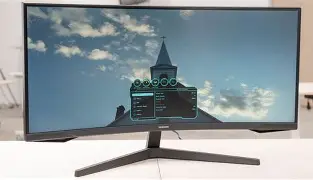
The on-screen menu is straightforward but not particularly modern. I liked the preset game modes (FPS, RTS, etc.) for quick tweaks, and the crosshair overlay was a handy novelty in shooters when I wanted a static reticle. What I found lacking was deep color management or advanced calibration controls; for real color work you’ll want a hardware calibrator or more advanced monitor OSD options.
One practical feature I used often was the screen position presets — switching between a wide cinematic mode for single-player and a tighter, clearer mode for competitive play made the monitor feel versatile. However, I noticed the brightness uniformity could vary slightly across the panel at extreme settings, so I rarely pushed brightness to max for prolonged work sessions.
Sound & Accessories
The built-in speakers are passable for casual use — good enough for YouTube or voice calls — but they lack bass and richness for music or cinematic audio. I used external speakers or headphones for anything where audio quality mattered.
Included accessories were limited: just the power cable, display cable, and quick-start guide. No frills, but also no unnecessary extras. That matches the no-nonsense design language of the monitor.
Durability and Daily Reliability
After three months, the monitor shows no signs of burn-in, and the backlight is stable. The matte coating resists glare well, which I appreciated during daytime work sessions. I did notice a very slight banding in certain gradients when viewed up close, but nothing distracting during normal use.
Pros & Cons
- Pros:
- Immersive 1000R curvature that enhances cinematic and gaming experiences
- Strong contrast and deep blacks from the VA panel
- High refresh rate (configurable up to 165Hz) for smooth gameplay
- Good value for a 34-inch ultrawide with VA panel
- Sleek, unobtrusive design that fits most desks
- Cons:
- Stand is limited (tilt-only); VESA mount is almost required for ergonomic setups
- VA smearing/ghosting in high-contrast, fast motion scenarios
- Factory calibration leans cool; some color tweaking required for accurate work
- Limited OSD calibration options and no USB hub
- Built-in speakers are underwhelming
How It Compares: Quick Reference Table
| Feature | Odyssey G5 C34G55T (My Unit) | Common 34" IPS Alternative (e.g., LG 34-series) | Curved High-end Option (e.g., Odyssey G7) |
|---|---|---|---|
| Screen Size | 34 inches | 34 inches | 32–34 inches |
| Resolution | 3440×1440 | 3440×1440 | 3440×1440 |
| Panel Type | VA | IPS | VA (faster, higher contrast) |
| Curve | 1000R (very curved) | Flat or mild curve | 1000R / aggressive curve |
| Refresh Rate | Up to 165Hz | 120–144Hz | Up to 240Hz (selected models) |
| Color Accuracy (out of box) | Good, slightly cool | Generally better for color work | Good, often better factory calibration |
| Ergonomics | Tilt-only stand, VESA | Often includes height & swivel | Varies; some include height-adjust stands |
| Best For | Immersive gaming, movies, general purpose | Color-critical work and mixed use | Competitive gaming with immersive curvature |
Buying Guide: Who Should Consider the Odyssey G5 C34G55T?
After testing it for weeks and living with it daily, here’s how I’d recommend deciding whether this monitor is right for you.
Find top-rated Electronics products at great prices.
Browse Now →Choose it if:
- You want an immersive ultrawide experience without spending a premium on flagship features.
- You prioritize contrast and cinematic depth for single-player games, movies, and media consumption.
- You don’t need perfect motion performance for top-tier competitive play, or you can accept a small trade-off for improved color and contrast.
- You have or plan to use a VESA arm or alternative stand for ergonomic flexibility.
Consider alternatives if:
- You are a professional who needs out-of-the-box color accuracy for photo/video editing — an IPS ultrawide may serve you better.
- You are a hardcore competitive gamer who needs the absolute lowest persistence and fastest pixel transitions.
- You need full ergonomic adjustments without adding a VESA mount.
Practical tips if you buy it
- Plan for a VESA mount unless you’re happy with a tilt-only setup.
- Run a quick color temperature tweak in the OSD or use a basic calibration utility to warm up the image if it feels too cool.
- Use the overdrive setting to balance ghosting vs. overshoot — I found medium overdrive to be the best compromise.
- If you switch between PC and console frequently, label your input sources or use a KVM — switching HDMI/DP cables repeatedly is a pain.
- Lower the brightness from max for long work sessions to reduce eye strain and to improve uniformity perception.
Real-World Use Cases from My Experience
Here are some examples of how the monitor fit into my actual day-to-day life over the past three months.
Content Consumption
Watching movies and streaming shows is where the Odyssey G5 excelled for me. The deep blacks and curvature made cinematic content feel more immersive, and I found myself leaning into scenes more than I did on my old screens. Subtitles remained legible at native resolution, and the wide aspect ratio gave a pleasant cinematic letterbox feel without losing UI real estate for media controls.
Work and Productivity
For productivity, the ultrawide was a game-changer. I could keep a document, browser, and communication app visible without awkward window snapping. That said, color-critical tasks required calibration — I wouldn’t rely on this monitor for final color grading without proper tools. Once I adjusted the color temperature and contrast, general office work and photo sorting were comfortable and efficient.
Gaming
Single-player RPGs, open-world titles, and racing games looked fantastic. The 1000R curve makes the world feel more present. Competitive multiplayer felt good but I did notice slight trailing in certain fast-paced scenes — again, not a dealbreaker for most of my gaming, but worth noting if you play at the highest competitive level.
Conclusion
After three months with the Odyssey G5 C34G55T, my overall impression is that it delivers excellent immersion and great value for a 34-inch ultrawide. I appreciated the deep curvature, strong contrast, and smooth high refresh rates for most gaming and media tasks. The real compromises are the basic stand, typical VA motion artifacts, and a factory calibration that benefits from minor tweaking.
In my experience, if you want an immersive, cinematic monitor for mixed use — gaming, streaming, and productivity — and you're comfortable using a VESA mount for better ergonomics, the Odyssey G5 is a compelling choice. If you prioritize out-of-the-box color accuracy or are a competitive esports player chasing the lowest possible motion persistence, you may want to compare IPS ultrawides or higher-end esports-focused displays before deciding.
For my setup, it delivered exactly the immersive experience I was after and has become the centerpiece of my desk. I was surprised by how much I used the extra horizontal space; it changed how I work and play. The few annoyances I encountered were manageable and, in my opinion, outweighed by the monitor’s strengths.