The Truth About the K63 Wireless: Pros, Cons, and Verdict
The mechanical keyboard market has evolved significantly over the last decade, transitioning from a niche enthusiast interest into a mainstream desktop staple. While wired keyboards have long dominated the gaming sector due to concerns over latency and reliability, the demand for wireless freedom has pushed manufacturers to innovate. Among the pioneers of high-performance wireless mechanical peripherals, the Corsair K63 Wireless stands as a noteworthy entry, specifically designed to bridge the gap between sofa-based comfort and competitive-grade performance. In this evaluation, we explore the nuances of the K63 Wireless, a Tenkeyless (TKL) keyboard that aims to satisfy both the hardcore gamer and the living room media enthusiast.
Understanding the value of the K63 Wireless requires looking at the specific problem it was designed to solve. Most wireless keyboards are membrane-based office tools, which lack the tactile response and durability required for gaming. Conversely, most mechanical keyboards are anchored to the desk by thick braided cables. The K63 Wireless attempts to offer the best of both worlds by utilizing 2.4GHz wireless technology alongside genuine mechanical switches, all while maintaining a compact form factor that fits into specialized lapboard accessories.
The Technical Foundation: Switches and Connectivity
At the heart of the K63 Wireless are the Cherry MX Red mechanical switches. These are linear switches, meaning they provide a smooth, consistent keystroke from top to bottom without a tactile "bump" or audible click. For gamers, this is often the preferred choice as it allows for rapid-fire key presses and reduces the fatigue associated with stiffer switches. The use of genuine Cherry MX switches is a statement of quality, ensuring that the keyboard maintains its feel and responsiveness over millions of actuations, unlike cheaper clones found in budget wireless alternatives.
However, the real magic of this unit lies in its connectivity. Corsair utilizes a 1ms 2.4GHz wireless connection optimized for gaming. In practical use, this means that even in fast-paced shooters where every millisecond counts, the delay between a physical press and the on-screen action is indistinguishable from a wired connection. For those who prioritize security or want to use the keyboard across multiple devices, it also offers 128-bit AES wireless encryption and a Bluetooth mode. This versatility allows a user to switch from a high-performance gaming PC to a tablet or a smart TV with a simple shortcut.
Design and Build Quality
The K63 Wireless follows a Tenkeyless (TKL) layout, which removes the numeric keypad. This design choice is intentional; it reduces the overall footprint, allowing for more room for mouse movement on a crowded desk or making it more portable for those who travel to LAN events. The chassis is constructed from high-quality plastic with a sleek, matte finish. While it lacks the brushed aluminum top plate found on some of Corsair’s more premium wired models, like the K70 series, the build remains remarkably rigid with very little flex.
One of the most appreciated design features is the inclusion of dedicated media controls. Users can adjust volume, skip tracks, and play or pause media without ever leaving their game or application. There are also dedicated buttons for adjusting the brightness of the blue LED backlighting and a Windows Key lock button, which prevents accidental interruptions during intense gameplay sessions. The blue backlighting is consistent across all keys, though it is limited to a single color rather than full RGB spectrum—a trade-off likely made to preserve battery life in a wireless device.
Real-World Performance: The Living Room Experience
To truly understand the "truth" behind the K63 Wireless, one must look at it through the lens of the "couch gamer." Corsair released a companion lapboard for this specific model, which essentially turns the keyboard and a mousepad into a singular, stable platform for your lap. This transforms the PC gaming experience, allowing players to enjoy high-fidelity graphics on a large television while maintaining the precision of a mouse and keyboard.
Discover deals on Electronics — updated daily.
Shop Amazon →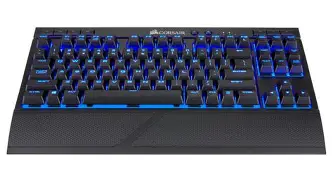
In this scenario, the K63 Wireless excels. The 2.4GHz dongle provides a stable connection even across a living room, resisting interference from other wireless devices. The detachable wrist rest, which comes included with the keyboard, provides essential ergonomic support during long sessions. For the user who wants to consolidate their setup, the ability to use Bluetooth to control a home theater PC and then switch to the low-latency dongle for a gaming session is a seamless workflow that few other high-performance mechanical keyboards can match.
Battery Life Considerations
Wireless peripherals are only as good as their battery life, and this is where the K63 Wireless requires some management. With the blue backlighting turned up to its maximum brightness, the battery life is rated for approximately 15 hours. While this is sufficient for a few days of moderate gaming, heavy users will find themselves reaching for the charging cable frequently. However, if the lighting is turned down or off entirely, the battery life extends significantly, reaching up to 75 hours of use.
Charging is handled via a micro-USB port. In an era where USB-C has become the standard for most modern electronics, the reliance on micro-USB feels slightly dated. It does, however, allow the keyboard to function as a fully wired peripheral while charging, meaning you never actually have to stop using it. The LED indicators on the top of the chassis do a good job of warning the user when the power is running low, preventing unexpected shutdowns in the middle of a match.
Comparison of Specifications
To better visualize how the K63 Wireless sits in the market, the following table compares its key features against common industry standards for wireless and wired mechanical keyboards.
| Feature | K63 Wireless Standard | Standard Gaming Wired | Standard Office Wireless |
|---|---|---|---|
| Switch Type | Cherry MX Red (Mechanical) | Varies (Mechanical) | Membrane/Scissor |
| Latencies | 1ms (2.4GHz) | 1ms (USB) | 8ms - 20ms+ |
| Layout | Tenkeyless (TKL) | Full Size or TKL | Full Size |
| Backlighting | Single Color LED (Blue) | Full RGB | None or White |
| Battery Life | 15 - 75 Hours | N/A (Cabled) | 6 - 24 Months |
| Connectivity | 2.4GHz, BT, Wired | Wired Only | BT or 2.4GHz |
Pros and Cons
Every piece of technology involves trade-offs. The K63 Wireless is a specialized tool, and its effectiveness depends largely on the user's specific environment. Below are the primary advantages and disadvantages observed through extensive use and buyer feedback.
Pros
- Exceptional Wireless Performance: The ultra-fast 1ms 2.4GHz connection ensures there is no discernible lag, making it truly viable for competitive gaming without a cord.
- Genuine Cherry MX Red Switches: Unlike many wireless keyboards that use proprietary or budget switches, the K63 uses the industry-standard Cherry MX for a high-quality, durable typing experience.
- Dedicated Media Controls: Having physical buttons for volume and playback is a major convenience, especially when using the keyboard in a media center or living room setup.
- Versatile Connectivity: The inclusion of Bluetooth and 128-bit AES encryption makes it suitable for both casual multi-device use and secure professional environments.
- Lapboard Compatibility: It is one of the few keyboards specifically designed to fit into a lapdog/lapboard ecosystem, making it the premier choice for couch-based PC gaming.
Cons
- Battery Life with Lighting: If you enjoy the aesthetic of backlighting, the 15-hour battery life can feel limiting and requires frequent charging cycles.
- Micro-USB Charging: The choice of micro-USB over the more modern and robust USB-C standard is a drawback for users looking to unify their cable management.
- Single Color Backlighting: In a market where RGB lighting is standard for gaming gear, being restricted to blue may not appeal to users with specific desktop color themes.
- Plastic Construction: While sturdy, it lacks the premium "heft" and cold-to-the-touch feel of aluminum-framed keyboards found in the same price bracket.
Buying Guide: Is the K63 Wireless Right for You?
Deciding whether to invest in the K63 Wireless requires an honest assessment of your gaming habits and desk layout. This keyboard is not a "one size fits all" solution, but for certain users, it is arguably the best option available.
The Couch Gamer: If your primary goal is to play PC games from your sofa on a large-screen television, the K63 Wireless is the gold standard. When paired with the Corsair lapboard, it provides a stable, ergonomic experience that mimics a desk setup. The low latency is vital here, as standard Bluetooth keyboards often stutter or lag when faced with the distance and interference common in living rooms.
Find top-rated Electronics products at great prices.
Shop Amazon →The Minimalist Desktop User: For those who hate cable clutter and want a clean, TKL aesthetic, the K63 Wireless offers the performance of a high-end gaming keyboard without the "snake" of wires crossing the desk. The ability to quickly move the keyboard aside to make space for drawing, writing, or other tasks is a significant workflow benefit.
The Travel Enthusiast: Because it is a TKL board, it fits more easily into backpacks than full-sized alternatives. If you often find yourself gaming on a laptop at a friend's house or attending LAN parties, the wireless nature of the K63 simplifies your setup process and reduces the number of cables you need to pack.
Things to Consider Before Buying: Before making a purchase, check if you absolutely need a numeric keypad. If your daily work involves heavy data entry or spreadsheet management, the TKL layout may prove frustrating. Additionally, consider your tolerance for charging peripherals. If you are the type of person who forgets to plug in your mouse or phone, you might prefer a wired keyboard that never requires power management.
The Verdict
The Corsair K63 Wireless occupies a unique space in the peripheral market. It is not trying to be the most luxurious keyboard ever made, nor is it trying to be the most portable. Instead, it is a high-performance, functional tool designed for people who refuse to sacrifice mechanical precision for wireless convenience. It effectively solves the latency issues that plagued early wireless gaming gear, proving that "wireless" and "competitive" can exist in the same sentence.
While the battery life with the backlight turned on is a clear weak point, and the use of micro-USB feels slightly out of step with modern trends, these are manageable compromises. The core of the experience—the typing feel of the Cherry MX Reds and the rock-solid 1ms wireless connection—remains top-tier. For the living room gamer, it is a transformative device that opens up new ways to enjoy the PC platform. For the desktop user, it is a reliable, clutter-free workhorse. Ultimately, the K63 Wireless is a successful evolution of the mechanical keyboard, providing a specialized solution for a modern gaming lifestyle that isn't always tethered to a traditional desk.